In this article
A cheat sheet fits on one page. That is the whole appeal. Your reader is stuck mid-task, they open your page, and the answer is right there. This guide shows how to build one in a weekend, put it behind an email opt-in, and make sure it gets used instead of filed away.
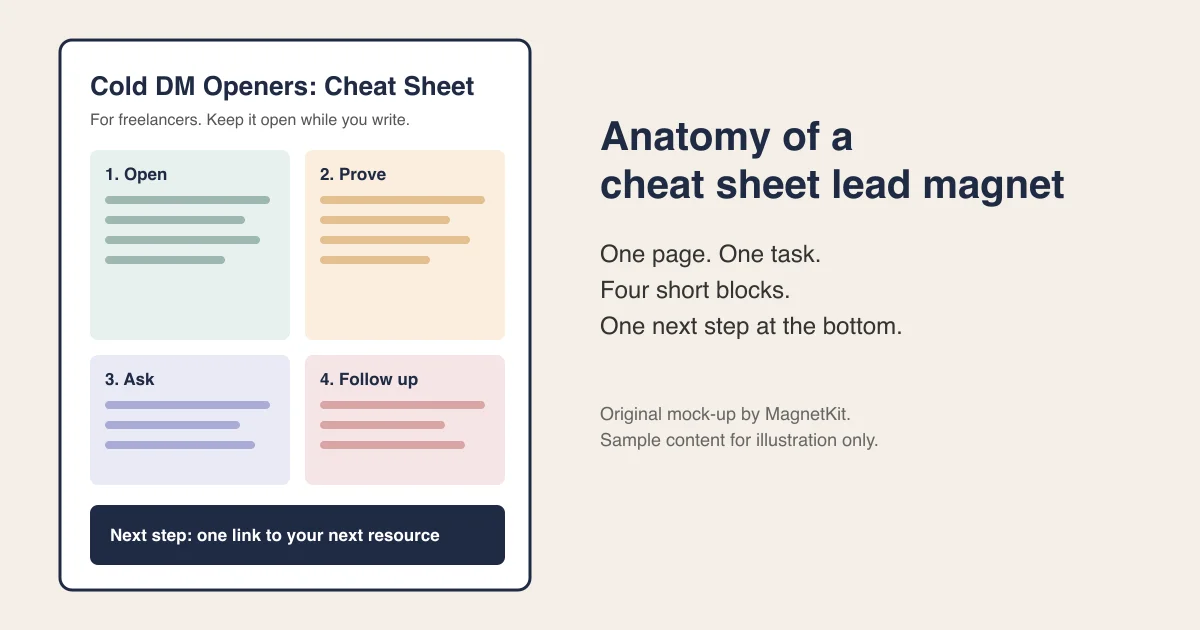
What You’ll Need
- One task your reader repeats. Not a topic. A task, like writing a cold DM, picking a subject line, or setting up a weekly routine.
- Your own working knowledge of that task. The formulas, terms, settings, or steps you reach for without thinking.
- A page builder. Google Docs for speed and zero cost. Canva if you want a designed, branded PDF.
- An email tool that can send a file or a link. Brevo, MailerLite, Kit, or whatever you already use.
- A weekend. Plan on a few hours for the content and a few for layout and setup. The format rewards cutting, not adding.
What Is a Cheat Sheet Lead Magnet?
A cheat sheet is a concise set of notes used for quick reference. Wikipedia’s cheat sheet entry also lists “job aid” as another name for it, which is the useful way to think about it: a tool that helps someone do a job, not an essay about the job.
As a lead magnet, it is a cheat sheet your reader gets in exchange for an email address. It works for the same reason a good keyboard shortcut list works. It saves the reader from re-learning something every time.
It is not an ebook and it is not a checklist. A checklist tells the reader what to do in order. A cheat sheet gives them the lookup material they need while they do it. Many good cheat sheets are part of both, but the center of gravity is reference.
Here is how the main shapes differ.
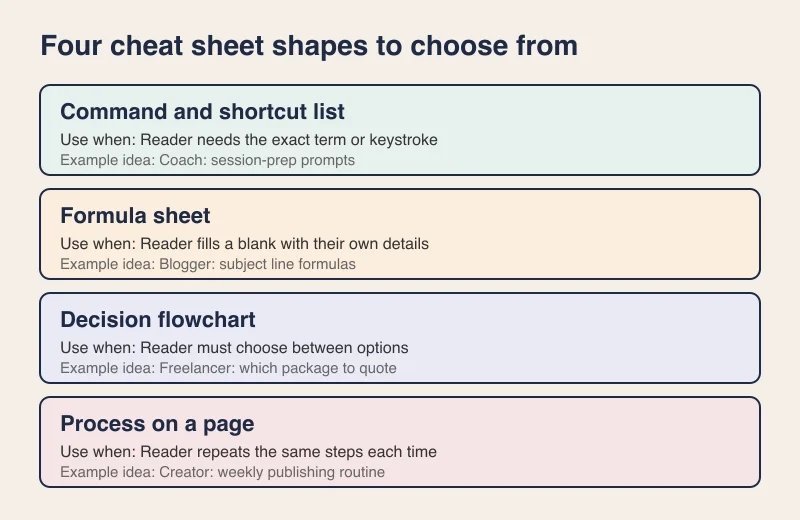
| Shape | Use it when | Example idea (illustrative) |
|---|---|---|
| Command and shortcut list | The reader needs the exact term or keystroke | A coach’s list of session-prep prompts |
| Formula sheet | The reader fills a blank with their own details | A blogger’s subject line formulas |
| Decision flowchart | The reader has to choose between options | A freelancer’s “which package to quote” chart |
| Process on a page | The reader repeats the same steps every time | A creator’s weekly publishing routine |
Table source: MagnetKit’s own format breakdown. Examples are illustrations, not client results.
Step 1: Pick one task, not one topic
“Social media cheat sheet” is a topic. Nobody searches their own head for it in the middle of a job. “Instagram caption openers for coaching offers” is a task. The reader can picture the exact moment they will open it.
Test your idea with one question. Can you finish this sentence: “Keep this open while you ___”? If the blank is a verb phrase (write a DM, plan a launch email, set up a form), you have a task. If you cannot fill it in, the idea is still a topic.
Our three reader personas point to three different tasks:
- Maya, a coach: prompts for preparing a discovery call.
- Jordan, a blogger: subject line patterns for a newsletter.
- Carlos, a freelancer: a quick chart for deciding what to quote on a new inquiry.
Pick the task you already know cold. A cheat sheet is only as good as the practical knowledge behind it, and you cannot fake that on one page.
Step 2: Choose the cheat sheet shape
Use the table above. Match the shape to what the reader does with the page.
If they copy and adapt, build a formula sheet. If they look something up, build a command list. If they decide between options, build a flowchart. If they repeat steps, build a process page.
Do not mix all four. A sheet that is part formula list, part flowchart, and part glossary asks the reader to figure out how to read it before they can use it. One shape, one job.
If you are not sure which lead magnet format fits your audience at all, start with How to Create a Lead Magnet (Every Format) and come back once you have picked a cheat sheet.
Step 3: Dump everything, then cut to one page
Open a blank document and write every item that could belong on the sheet. Do not edit yet. Most people end up with far more than one page.
Now cut. For each item, ask: would my reader reach for this in the middle of the task? If the answer is “it is good background,” it does not belong on the sheet. Move it to a blog post, a follow-up email, or a longer lead magnet.
A useful range to aim for is a handful of short blocks, not a long list. We recommend four to six blocks, each answering one question the reader has at that moment. That is our guideline, not a measured benchmark. If you need eight blocks, check whether two of them are really the same question.
Write each item in the reader’s words, not yours. “Opener” works. “Initial rapport-building outreach framework” does not.
Step 4: Lay it out so it can be scanned
A reader who opens a cheat sheet is mid-task. They will not read it. They will scan it for one thing and leave.
That is a cognitive load problem. In cognitive psychology, extraneous cognitive load is the effort that comes from the way information is presented rather than from the topic itself. Layout is where you reduce it.
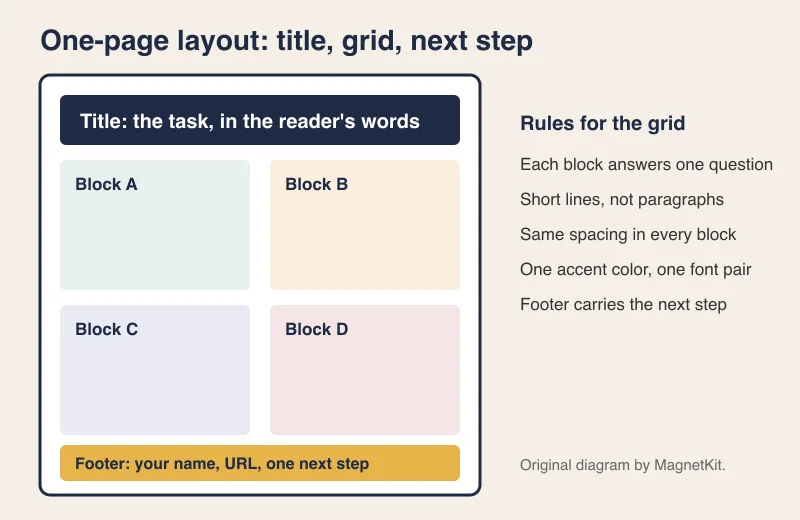
Use this structure:
- A title in the reader’s words, at the top. It names the task.
- A grid of short blocks, each with a plain label. Two columns of two or three blocks each works for most sheets.
- Short lines, not paragraphs. If a block needs a paragraph, it is probably two blocks.
- A footer, with your name, your site, and one next step (more on that in step 5).
Keep to one accent color and one font pair. Leave white space between blocks. The sheet should still make sense if someone prints it in black and white or opens it on a phone.
Build it in Google Docs if the content is mostly text. Use a table with no visible borders for the grid. Build it in Canva if you want colored blocks and a branded look. Our guide to making a lead magnet in Canva covers the tool in detail.
Not sure a cheat sheet is the right format for your audience? Download the Lead Magnet Decision Matrix, a one-page visual that matches audience type to the best lead magnet format. Free. Takes 2 minutes.
Step 5: Add one next step in the footer
A cheat sheet gets saved and reopened. That makes the footer the most-seen real estate in your funnel. Do not waste it on a logo alone.
Add exactly one next step. Examples:
- A link to the blog post that explains the method behind the sheet.
- A link to a longer resource, such as a workbook or a mini-course.
- A reply prompt: “Reply to the delivery email and tell me which block you use most.”
One step, not three. If you offer a paid product, this is where it belongs. If you do not yet, point to the next free resource. The goal is to turn a reference page into a reason to stay in touch.
Put your site URL in plain text as well as a link. Printed or screenshotted copies lose the link, and the URL is how a forwarded sheet finds its way back to you.
Step 6: Export, test, and name the file
Export as PDF. Then test it three ways:
- On a phone. Can you read every block without zooming?
- In grayscale. Print preview in black and white. Does the structure still work?
- With a stranger. Hand it to one person who does the task. Ask them to find a specific item. Time how long they take. If they hunt, the labels are wrong.
Name the file for the task, not for your brand: cold-dm-openers-cheat-sheet.pdf, not final-v3-new.pdf. People search their downloads folder by task.
Keep the source file. You will update it later, and rebuilding from scratch is the main reason cheat sheets go stale.
Step 7: Build the landing page and the delivery
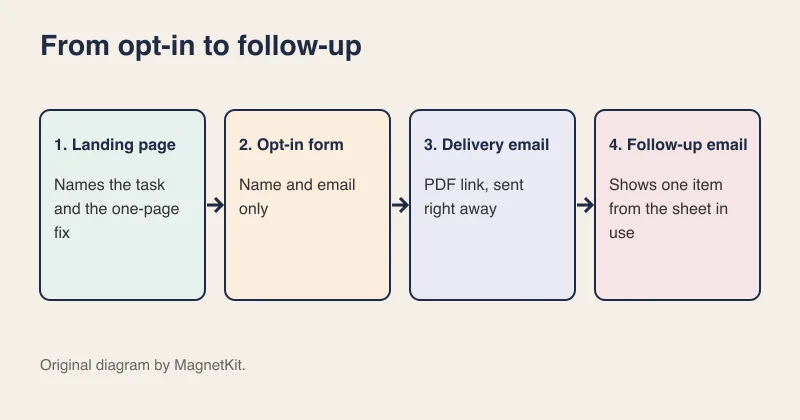
The landing page promise matters more than the design of the sheet. Name the task and the result: “The one-page cheat sheet for writing cold DMs that get replies” beats “Free Cheat Sheet.”
Keep the page short:
- A headline naming the task.
- Three or four bullets of what is on the sheet.
- A preview image of the sheet itself.
- A form asking for name and email only.
Our lead magnet landing page guide goes into the layout in detail.
Then set up delivery. The reader should get the PDF or a link right after they opt in. Our guide to the lead magnet delivery email has copy you can adapt. Most email tools, including Brevo, MailerLite, and Kit, can send a file link on signup. Plan limits change, so check your tool’s current pricing page before you commit.
Step 8: Send one follow-up that shows the sheet in use
Do not leave the sheet alone after delivery. A day or two later, send one short email that picks a single item from it and shows how to use it on a real example.
This does three jobs. It reminds the subscriber the sheet exists. It shows them one item in action, which raises the odds they open it again. And it gives you a natural second email that proves you know the topic.
If you want more ideas for the sequence, see our guide to lead magnet follow-up emails.
Step 9: Review it on a schedule
A cheat sheet goes stale when the tool, platform, or practice it describes changes. Set a reminder to review the sheet on a regular schedule, such as quarterly if it references a specific platform. Swap out what has changed. Do not rebuild it.
If subscribers reply with questions, read them. A repeated question is usually a missing block.
Why Do Cheat Sheet Lead Magnets Fail?
Most failures come from three habits.
Too broad. A sheet on “marketing” helps no one at the moment of need. Narrow it to the task.
Too long. A cheat sheet that spills onto a third page is a short ebook. Readers who wanted a quick lookup leave. Cut, or split it into two sheets.
No next step. The sheet gets saved, used, and never traces back to you. The footer in step 5 fixes that.
A fourth, quieter failure is polish. Do not spend a week on layout before you know anyone wants the sheet. Ship the plain version, watch whether people opt in, and improve from there. If it is not converting, our lead magnet audit guide lays out what to check first.
Frequently Asked Questions
What is a cheat sheet lead magnet?
A cheat sheet lead magnet is a one-page reference, such as a list of formulas, commands, or steps, that a reader receives in exchange for their email address. It is built for quick lookup in the middle of a task. Wikipedia describes the general format as a concise set of notes for quick reference.
How long should a cheat sheet lead magnet be?
One page is the target. If your content needs a second page, check whether two of the blocks answer the same question, or whether the sheet is trying to cover two tasks. Two pages front and back is acceptable when the layout stays scannable. A third page turns it into a short ebook.
What is the best tool to make a cheat sheet?
Google Docs is the fastest free option, especially for text-heavy sheets that use a borderless table as the grid. Canva suits designed, colored layouts and exports clean PDFs. Both have free plans, though their limits change, so check the current terms. The tool matters less than the one-task focus.
How is a cheat sheet different from a checklist lead magnet?
A checklist is a sequence the reader works through and ticks off. A cheat sheet is a reference the reader looks up while working. A checklist answers “what do I do next?” and a cheat sheet answers “what is the exact term, formula, or option?” Some pages combine both, but one should lead.
Do I need design skills to make a cheat sheet?
No. A clear title, four to six labeled blocks, short lines, and consistent spacing cover most of what makes a sheet readable. Start in Google Docs with a borderless table. If the content works, you can move it to a designed Canva template later without changing anything else in the funnel.
Ready to Pick Your Format?
A cheat sheet is one good option. The right format depends on what your audience does and how much time you have. The Decision Matrix matches the two in a single page.
Get the free Lead Magnet Decision Matrix
Free. Two minutes. Email only.
Keep Reading
What to Do Next
Choose the path that fits where you are right now.
Pick Your Lead Magnet Format Before You Build.
Get the free three-page Decision Matrix PDF. Match your audience to a lead magnet format, with a format quick reference to help you start building.
Get the Decision MatrixRelated Articles
How to Build a Resource Library Lead Magnet (Step-by-Step)
How to build a resource library lead magnet: inventory what you already have, fill the gaps, organize it into sections, and gate it behind one opt-in.
How to Build a Mini Course Lead Magnet
A step-by-step guide to creating a mini course lead magnet: topic selection, lesson structure, recording, delivery platform, and email automation.
How to Create a Scorecard Lead Magnet (Step-by-Step)
How to build a scorecard lead magnet: pick one thing to measure, design scoring dimensions, write tier-based results, and set up delivery.