In this article
You keep hearing you need a lead magnet. Nobody explains what one is.
A lead magnet is a free, useful resource you give someone in exchange for their email address. That is the whole idea. This guide shows how it works, which formats to choose, and how to build your first one in a weekend using free tools.

What You’ll Need
Gather these before you start. You can begin all of it on free plans.
- One audience you can describe in a sentence, such as “new freelance designers”
- One problem that audience has right now
- A free Canva or Google Docs account to build the resource
- An email tool with a free plan, such as Kit or MailerLite
- A place to offer it: your website, a link-in-bio page, or a blog post
- A quiet afternoon or a weekend, depending on the format you pick
Step 1: Understand What a Lead Magnet Is (and What It Is Not)
A lead magnet is a free, specific resource that a person receives in exchange for their email address. It solves one small problem fast, such as a checklist, template, or short guide. OptinMonster describes it as a free, valuable resource that solves a specific problem and motivates people to sign up.
Here is the trade in plain terms. The reader gives you an email address. You give them something useful right away. That address is permission to keep helping them.
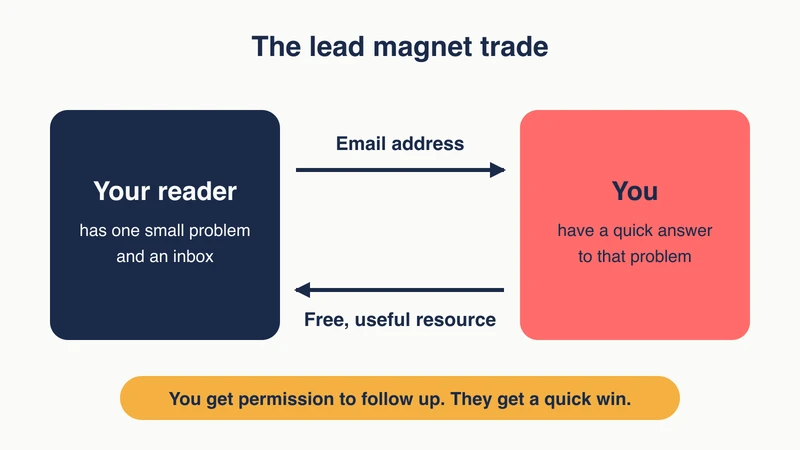
Why bother? Because an email list is the one audience you own. Social platforms decide who sees your posts. Your list does not depend on an algorithm. When you have something new to share, you write an email and it lands in an inbox.
Picture a few examples:
- A career coach offers a one-page resume refresh checklist.
- A personal finance blogger offers a monthly budget template.
- A freelance web designer offers a checklist of what to send before a website project starts.
Each one solves a small problem in minutes. Each one points toward a bigger service, product, or newsletter.
Now the things that are not lead magnets:
- A “subscribe for updates” box. It asks for an email and offers nothing today.
- A 40-page ebook you have not written yet. It can work, but it is the slowest format to build, and readers often skim or skip long PDFs. The checklist vs. ebook comparison shows why smaller often wins.
- A sales call in disguise. A free consultation can work for service businesses. But it is a sales conversation, not a resource the reader can use alone tonight.
Want the full menu of formats? The lead magnet ideas guide covers them all. For now, keep going.
Step 2: Pick One Problem Your Audience Wants Solved Now
The best lead magnets solve one narrow problem in one sitting. Write your reader’s problem as a single sentence: “I want [result], but I keep [obstacle].” Then build the smallest useful thing that delivers a first win. Narrow wins because a visitor can tell in seconds whether it is meant for them.
Most first attempts fail here, not in the design. The topic is too big.
“Social media tips” is a topic. “Seven caption starters for coaches who hate writing” is a lead magnet.
Use this simple formula: one painful problem, one quick win, one clear next step. The next step is your paid offer, your newsletter, or a call.
Find the problem by listening. Check these places:
- Questions that show up in your DMs and comments
- Replies to your emails or newsletter
- Threads in communities where your audience asks for help, such as Reddit or Facebook groups
- The question you answer most often on client calls
Write down the three best problems. Pick the one that hurts most and can be solved in a few minutes of reading or doing. That is your topic.
Here is how broad topics become specific ones:
- Too broad: “Email marketing guide.” Specific: “A five-email welcome sequence template for new coaches.”
- Too broad: “Budgeting tips.” Specific: “A one-page budget for freelancers with uneven income.”
- Too broad: “Website checklist.” Specific: “What to send your designer before a site project starts.”
Running a blog? Tie the freebie to a single post. That is called a content upgrade, and the content upgrade ideas guide shows twelve ways to do it.
Step 3: Choose a Format That Fits the Problem
Most lead magnets fall into a handful of formats: checklists, cheat sheets, templates, swipe files, short guides, quizzes, and email mini courses. Effort ranges from an afternoon for a checklist to a weekend or more for a quiz. Pick the format that matches the reader’s problem, not the one that looks most impressive.
| Format | What the reader gets | Typical first-draft time | Best when the reader says |
|---|---|---|---|
| Checklist | A one-page list of actions to tick off | 1-2 hours | “I keep forgetting a step” |
| Cheat sheet | Key facts or formulas on one or two pages | 2-3 hours | “I need a fast reference” |
| Template | A fill-in-the-blank file (Docs, Notion, Canva) | 2-4 hours | “I stare at a blank page” |
| Swipe file | A collection of proven examples to copy | 2-4 hours | “I do not know what good looks like” |
| Short guide (PDF) | Several pages that explain one process | 4-8 hours | “I need context, not just steps” |
| Quiz | Questions that end in a personal result | 1-2 days | “I do not know where to start” |
| Email mini course | A few emails sent over several days | 1-2 days | “I need to learn this in stages” |
Times are rough estimates for a first draft by one person. Your topic, tools, and experience will move them.
If this is your first one, start with a checklist or a template. They are fast to build, easy to finish, and easy to test. Save quizzes and mini courses for later, after you know your audience will opt in.
When you have picked, follow the build guide for that format: the checklist guide, the template guide, the swipe file guide, the quiz guide, or the mini course guide. Short on time? See simple lead magnet ideas you can finish in a day.
You are halfway through. If this is useful, get the weekly email too. The MagnetKit newsletter sends one format breakdown, one conversion tip, and one real example, in about three minutes of reading. Subscribe free
Step 4: Build It in One Sitting
Build the first version in one focused session. Open Canva or Google Docs, write the title as a promise, include only what the reader needs for the first win, and export a PDF. Finished and useful beats long and perfect. Improve version two after real people have used version one.
Follow these moves in order:
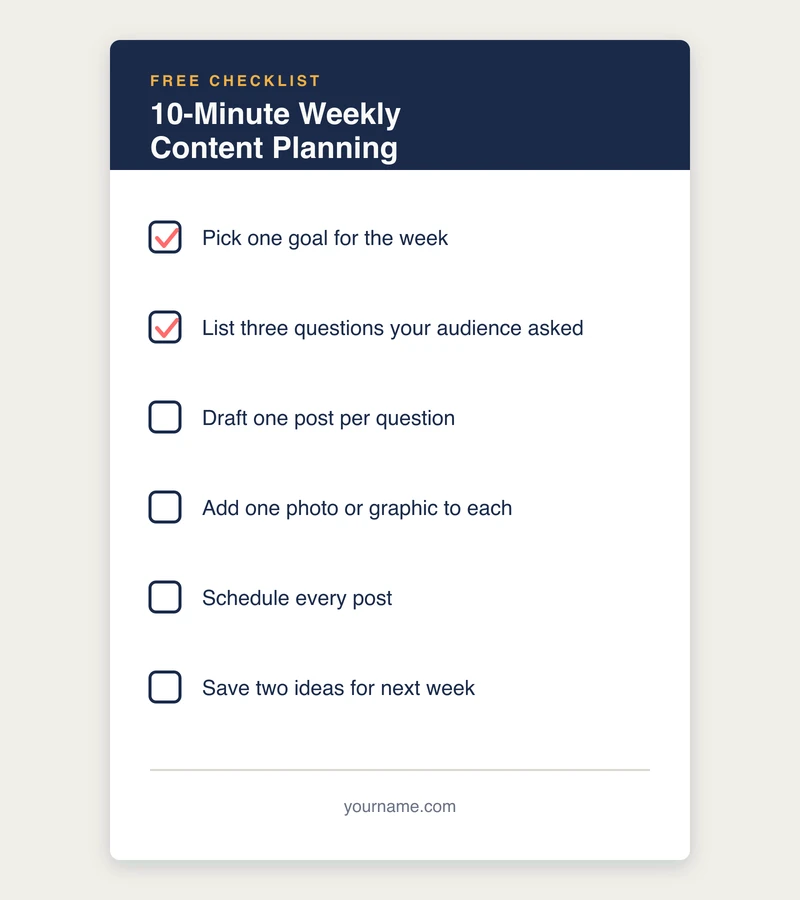
- Write the title as a promise. Name the result and the time it takes. “10-Minute Weekly Content Planning Checklist” tells the reader exactly what they get.
- Outline on paper first. List every item, then cut anything the reader does not need for the promised result. If an item needs a paragraph of explanation, split it or drop it.
- Build it in Canva or Google Docs. Use one or two fonts and your brand colors. White space is a feature, not wasted room.
- Add your name and one next step at the bottom. A website link or a single line about what to read next is enough.
- Export as a PDF. Give the file a clear name, such as
content-planning-checklist.pdf. - Open it on your phone. Many readers will open the download there, so make sure the text is readable without zooming.
Here is what a finished one-page checklist can look like. One page, one promise, six actions.
Need more help with the build? The Canva walkthrough covers the tool. The design tips guide makes a plain page look professional.
Step 5: Put It Behind a Simple Opt-In Page
An opt-in page has one job: get the visitor to trade an email address for your resource. Use one headline that states the result, three short bullets, one email field, and one button. Remove menus and side links. Every extra choice gives the visitor a reason to leave without signing up.
The headline names the result. The bullets say what is inside. The button says what happens next, in the reader’s voice: “Send me the checklist.”
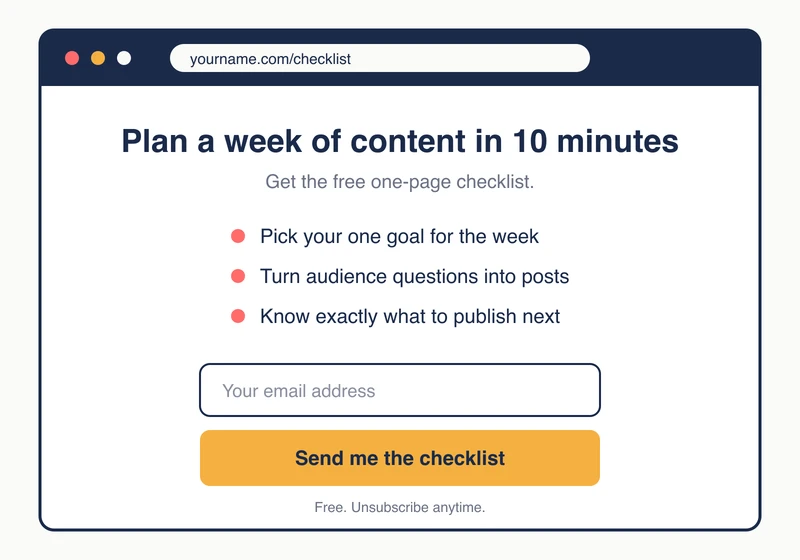
Ask for the email address only. A name field is one more thing to type, and you can ask for the name later in the welcome email if you want it.
Most email tools include a simple landing page or an embeddable form, so you do not need a separate website builder to start. The lead magnet landing page guide breaks down each part of a page that converts. The lead magnet copy guide helps with the headline and bullets.
Step 6: Set Up Instant Delivery
Instant delivery means the reader gets the resource the moment they sign up. In your email tool, connect the form to an automation that sends a welcome email with the download link. Test it with your own address before you promote it. A broken link loses the subscriber and the trust you just earned.
Set it up in this order:
- Create a form or landing page in your email tool.
- Upload the PDF, or host it where anyone with the link can view it.
- Create the automation that sends the link to every new subscriber.
- Sign up with a personal address and check that the email arrives, the link opens, and the file looks right on your phone.
- Check your spam folder too. If the email lands there, fix it before you promote the page.
Each tool works a little differently. Step-by-step setup guides are available for Kit, MailerLite, and Brevo. The delivery email guide covers the message itself.

Respect the rules from day one. If you email people in the United States, the CAN-SPAM Act covers your marketing emails. The FTC’s CAN-SPAM compliance guide says each commercial message must include your valid physical postal address and a clear way to opt out. It also says you must honor opt-out requests within 10 business days.
Most email tools add an unsubscribe link for you. Check that your address is in the footer too.
Have subscribers in the European Union? GDPR requires consent to be freely given, specific, informed, and unambiguous. So say plainly what people will get from you when they sign up. This is general information, not legal advice.
Step 7: Send a Welcome Email That Points to the Next Step
The delivery email should do three things: hand over the resource, set expectations for what comes next, and give one clear next step. Keep it short and personal. Subscribers who hear nothing after the download can forget who you are, so a short follow-up sequence keeps the relationship warm.
Keep the first email simple:
- Subject line: Name the resource. “Your 10-Minute Content Planning Checklist is inside.”
- Body: Two or three short lines. Here is the link. Here is how to use it in ten minutes. Here is what to expect from you next.
- One next step: Reply with a question, read one related guide, or book a call. Pick one, not three.
Then send a second email a day or two later. Ask how it went and share one related tip. The follow-up emails guide lays out a full five-email sequence that turns downloaders into buyers.
Step 8: Promote It and Check the Numbers
Put the lead magnet where your audience already pays attention: your bio link, a pinned post, your blog posts, and your email signature. Then track one number, your opt-in rate, which is new subscribers divided by page visitors. Change one thing at a time so you know what worked.
Start with these spots:
- Your link-in-bio page
- A pinned post on the platform where your audience follows you
- The end of blog posts on the same topic
- Your email signature
- A reply when someone asks the exact question your resource answers
Two guides go deeper: where to put your lead magnet on your website and how to promote your lead magnet.
To measure, use this formula:
Opt-in rate = (new subscribers ÷ visitors to the page) × 100
For example, if 100 people visit and 20 sign up, your opt-in rate is 20%.
Give the page a few weeks of real traffic before you change anything. Good numbers depend on where your visitors come from, so read what a good lead magnet conversion rate looks like before you judge yours.
Frequently Asked Questions
What is a lead magnet in simple terms?
A lead magnet is a free resource you give away in exchange for an email address. Think of a checklist, template, or short guide that solves one small problem quickly. The reader gets an instant win, and you get permission to email them again with more help and, later, an offer.
Is a lead magnet the same as a freebie or an opt-in?
Mostly, yes. People say lead magnet, freebie, opt-in incentive, and content upgrade for the same trade: something free for an email address. A content upgrade is a lead magnet tied to one blog post. The freebie lead magnet guide lists twelve formats to choose from.
What makes a good lead magnet?
A good lead magnet is specific, quick to use, and closely tied to what you offer next. It solves one problem in one sitting, looks clean on a phone, and leads naturally to your next step. If a stranger cannot tell who it is for within a few seconds, narrow the topic.
How long should a lead magnet be?
As short as it can be while still delivering the promised result. A checklist fits on one page, and a template can be a single file. Length does not create value. Solving the problem does. Add pages only when the reader would miss something without them.
Do lead magnets still work?
Yes, when they are specific and useful. Generic PDFs that promise everything tend to get ignored, while narrow tools that solve one problem still earn signups. The match between your promise and the reader’s problem matters more than the format. See why lead magnets are dead (and what replaced them) for the full argument.
Keep Reading
- Freebie Lead Magnet Ideas: 12 Formats That Work
- How to Create a Lead Magnet (Step-by-Step for Every Format)
- Simple Lead Magnet Ideas That Convert for Small Audiences
Ready to build yours? Pick one problem, choose a checklist or a template, and finish it this weekend. Everything else on this site builds on that first small win.
-> Start building your lead magnet
Free. No account required to browse the guides.
What to Do Next
Choose the path that fits where you are right now.
Pick Your Lead Magnet Format Before You Build.
Get the free three-page Decision Matrix PDF. Match your audience to a lead magnet format, with a format quick reference to help you start building.
Get the Decision MatrixRelated Articles
How to Build a Mini Course Lead Magnet
A step-by-step guide to creating a mini course lead magnet: topic selection, lesson structure, recording, delivery platform, and email automation.
How to Create a Scorecard Lead Magnet (Step-by-Step)
How to build a scorecard lead magnet: pick one thing to measure, design scoring dimensions, write tier-based results, and set up delivery.
How to Create a Swipe File Lead Magnet (Step-by-Step)
How to build a swipe file lead magnet: pick a niche, curate real examples, annotate them, and package it for email opt-ins.